Snapchat Planets in Order 2026 – ( Step-by-Step Guide )
Have you ever felt confused after seeing planets orbiting around your friend’s profile on Snapchat? Are you unable to understand what Mercury, Venus, Earth, and the other planets actually mean? Many Snapchat+ users become curious about their friendship ranking after discovering this feature. Some even start wondering whether the person they consider their best friend is a friend or not.
The Snapchat Planets feature ranks your best friends using a virtual solar system, where each planet represents a different position in your friendship ranking. However, understanding how the Snapchat Solar System works can be confusing at first. In this article, we will explain the complete Snapchat Planets order, the meaning of each planet, and an easy step-by-step method to check your friendship ranking on Snapchat.
Quick Facts About Snapchat Planets
- Nobody else can see your Friend Solar System, it’s completely private to you
- Snapchat+ is required, there’s no way to access this feature on the free version
- You’re placed at the center as the Sun, with your top eight friends orbiting around you as planets
- Closer planets mean closer friends: Mercury sits at #1, Neptune trails at #8
- It’s not a one-time snapshot, positions shift on their own as your activity with each friend changes
- Snaps, chats, and Story views all factor in, it’s not based on any single interaction
- Your list and a friend’s list rarely line up exactly, since each side is calculated independently
Find Your Snap Planet 🪐
Estimate your friend’s position in your Snapchat Friend Solar System using your interaction activity.
Your friend’s estimated planet
Mercury
#1 in Your Friend Solar System
What is the Snap Planets System?
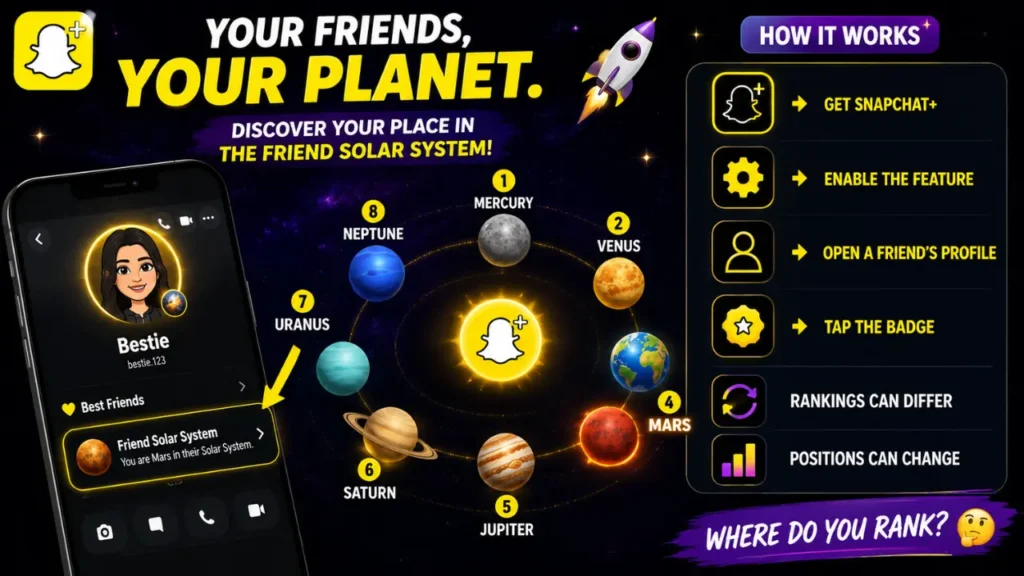
Snap Planets is the popular nickname for a feature Snapchat officially calls the Friend Solar System. Instead of showing your closest friends as a plain list, Snapchat+ turns them into a small solar system. You sit in the center as the Sun, and your top eight friends are placed around you as planets, with the friend you interact with the most sitting closest to the center.
According to Snapchat’s own support page, tapping the “Best Friends” badge with a gold ring on someone’s Friendship Profile shows you which planet you are in their Solar System, with each planet representing a different position in their Best Friends list.
What Is the Friend Solar System on Snapchat?
The Friend Solar System is the official name for this feature, and it lives inside Snapchat+ under “Using Snapchat+ Features.” In practice, it works like this:
- You are the Sun in your own personal solar system.
- Your eight most-interacted-with friends are assigned a planet each.
- The friend closest to the Sun (Mercury) is your #1 Best Friend.
- The friend farthest from the Sun (Neptune) is your #8 Best Friend.
- Each person’s solar system is calculated separately, so your friend’s view of you may not match your view of them.
This is a private feature. Nobody else can see your full solar system, and Snapchat does not send a notification when a friend’s rank moves up or down.
Do You Need Snapchat+ for Snapchat Planets?
Yes. The Friend Solar System is listed directly on Snapchat’s official Snapchat+ features page alongside other subscriber-only tools like Custom App Icon, Story Rewatch, and the #1 Best Friend pin. There is no way to view it on a free account, and there is no legitimate third-party tool that can show it to you either, since the feature runs entirely inside Snapchat’s own app using your private interaction data.How Do Snapchat Planets Work?
Complete Snap Planets Order
Easy way to remember the order: My Very Educated Mother Just Served Us Nachos.
My = Mercury, Very = Venus, Educated = Earth, Mother = Mars, Just = Jupiter, Served = Saturn, Us = Uranus, Nachos = Neptune. Same trick used for the real solar system, same order here.
Your position is not necessarily permanent. Snapchat’s Best Friends rankings can change as your interactions and activity with friends change over time.
Snapchat Planets in Order in Detail
There are eight Planets, following the same basic order as the planets in our real solar system. Each one corresponds to a position from #1 to #8 in the Friend Solar System.

1. Mercury
If someone’s Bitmoji shows up on Mercury, that’s as close as it gets on Snapchat. Mercury sits closest to the Sun, which means it marks the #1 spot in that person’s Friend Solar System, the friend they interact with more than anyone else right now.
Visually, it’s shown as a reddish planet surrounded by red hearts. Because rankings shift with recent activity, holding the Mercury spot usually means a steady back-and-forth of Snaps and chats, not just a one-time streak.

2. Venus
Venus takes the #2 position, just one step behind Mercury. It appears as a light brown or beige planet with a mix of pink, blue, and yellow hearts around it.
Being someone’s Venus still puts you firmly in their closest circle, the gap between #1 and #2 is often just a matter of slightly more frequent Snaps or longer conversations on one side.

3. Earth
Easy to recognize, Earth looks like the real planet: blue and green tones, with hearts, stars, and even a small Moon around it. Landing on Earth means #3 in that Friend Solar System.
It’s a solid, active friendship position, just not quite at the level of daily back-and-forth that Mercury or Venus represents.

4. Mars
Mars marks the #4 spot, shown as a reddish planet with hearts and stars around it. Think of it as a strong friendship that’s active but not constant. If you and a friend snap a few times a week rather than daily, Mars is often where that lands.
It still puts you in their top four, well ahead of the rest of the list.

5. Jupiter
Jupiter holds the #5 position and is displayed as an orange planet with stars around it. This is the midpoint of the Friend Solar System, past the “closest four” but still well within the top eight.
Friendships at Jupiter tend to be steady rather than intense, regular check-ins without the daily streak pressure.

6. Saturn
Saturn’s most obvious feature is its ring, shown in a yellow or golden tone with colorful stars nearby.
Sitting at #6, it usually represents a friend you catch up with here and there rather than every day, enough activity to stay in the top eight, but with more gaps in between.

7. Uranus
Uranus appears greenish or blue-green, often with stars scattered around it, and holds the #7 spot, near the outer edge of the ranking.
If you’re someone’s Uranus, the interaction is lighter and less frequent than the planets ahead of it, but you’re still one of only eight people who made their list at all.

8. Neptune
Neptune is the outermost planet and the #8 position, the last spot in the Friend Solar System. It’s shown as a blue planet farthest from the Sun. Being Neptune doesn’t mean a friendship is fading, it simply means, out of everyone that person interacts with, you’re their eighth most active connection on Snapchat. For context, that still puts you ahead of hundreds of other contacts who didn’t make the list at all.
Remember that being Mercury, Neptune, or any planet in between reflects Snapchat’s friendship-ranking system. It should not be treated as a measure of how meaningful a friendship is in real life.
How Snapchat Calculates Planet Rankings
Snapchat has not published the exact formula behind the Snapchat Solar System, and no independent source, including every competitor guide we reviewed while researching this article, has an official breakdown either. What Snapchat’s own support documentation does confirm is that the “Best Friends” badge reflects the eight friends you Snap and Chat with the most.
Based on that, the ranking is generally understood to be built from:
- How many Snaps you send and receive with a friend
- How often you Chat with them
- Story views and reactions between you
- Overall recent activity level with that specific person
Treat any claim more specific than this (exact weightings, reply-speed penalties, or “video Snaps count double”) as an educated guess rather than a confirmed fact, because Snapchat has not verified those details publicly.
What Is Snapchat Plus?
Snapchat+, also Known as Snapchat Plus, is Snapchat’s premium subscription service. It provides subscribers with access to exclusive, experimental, and personalization features beyond those available in the standard Snapchat experience. One of these features is the Friend Solar System, which is where Snapchat Best Friends Planets appear.
Key Features of Snapchat Plus
Depending on current availability and region, Snapchat+ may include features such as:
Snapchat regularly changes and tests Snapchat+ benefits, so the exact list of features available to subscribers may vary over time and by location.
How to buy a Snapchat Plus subscription?
You can subscribe to Snapchat+ directly through the Snapchat app. The available plans and payment options may depend on your device and region.
To Subscribe then open Snapchat on your iPhone or Android device.
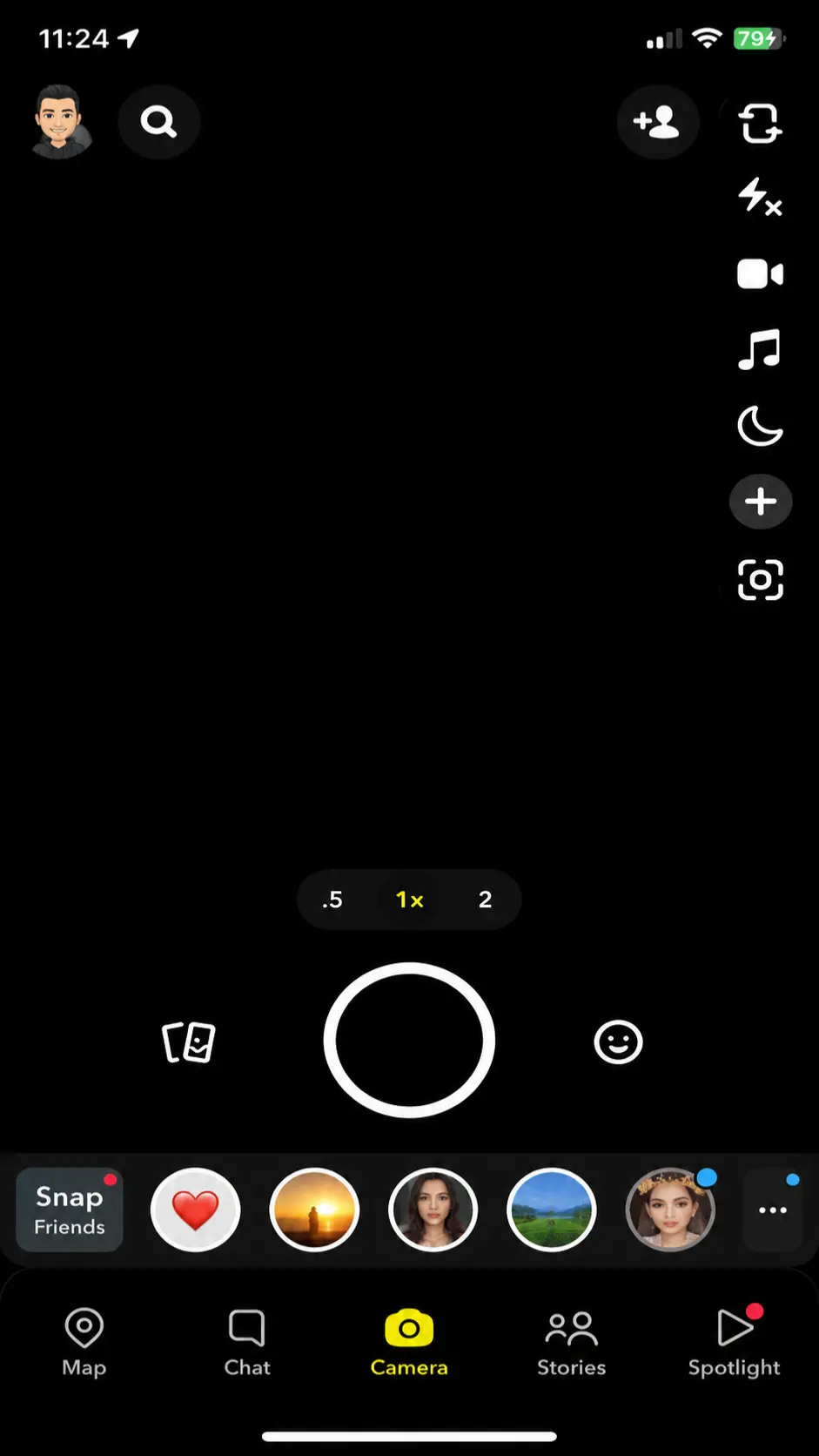
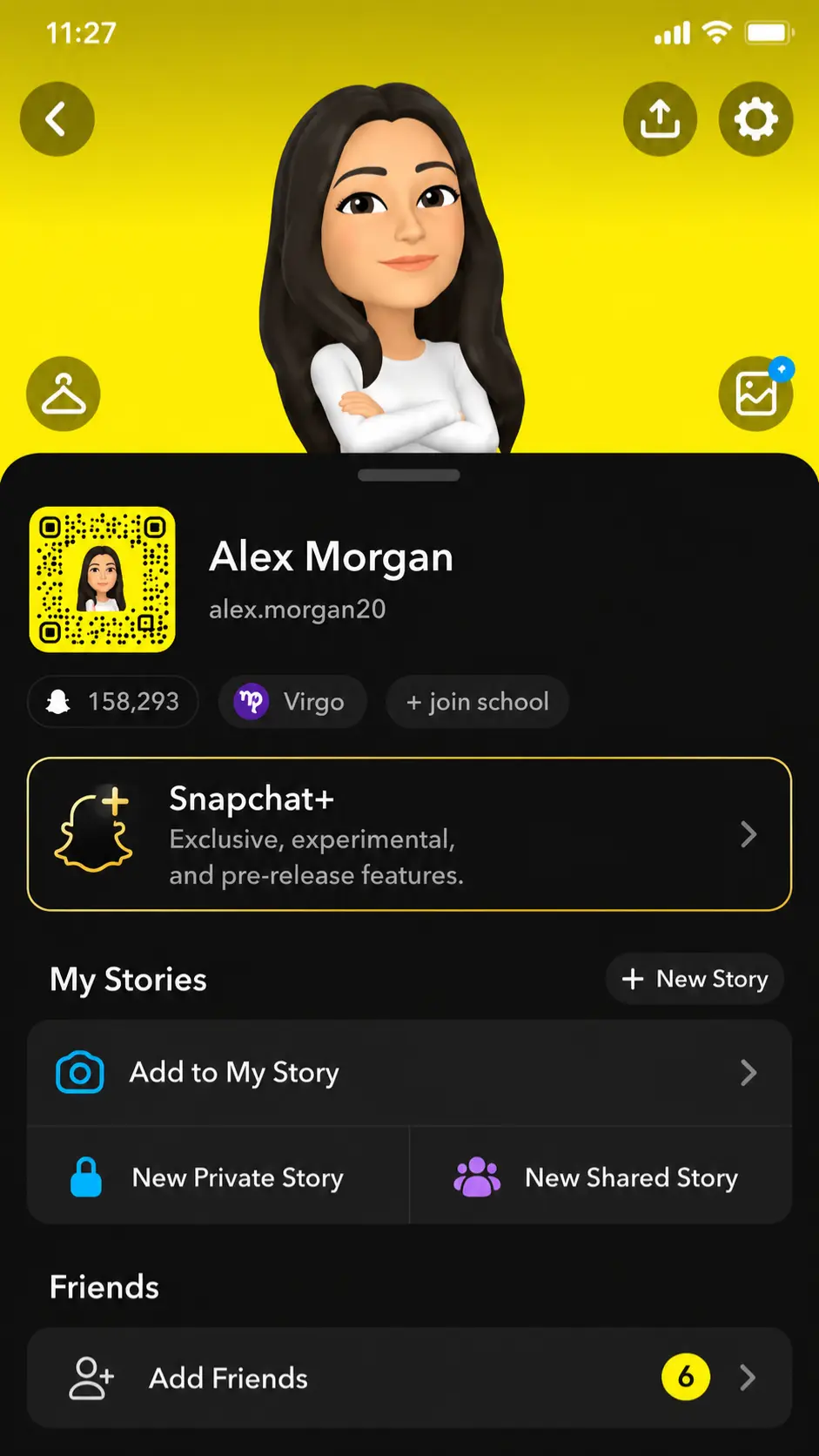
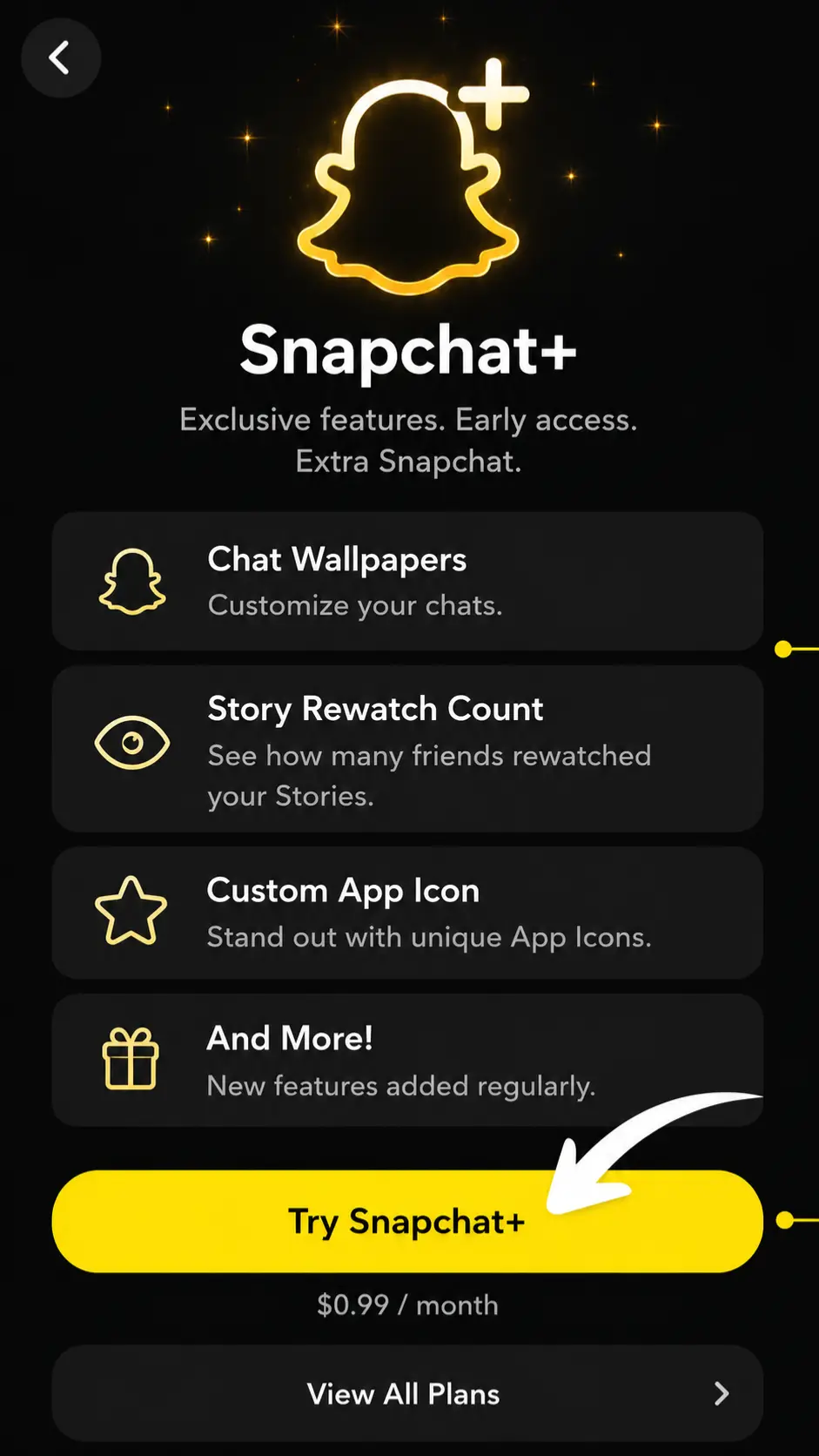
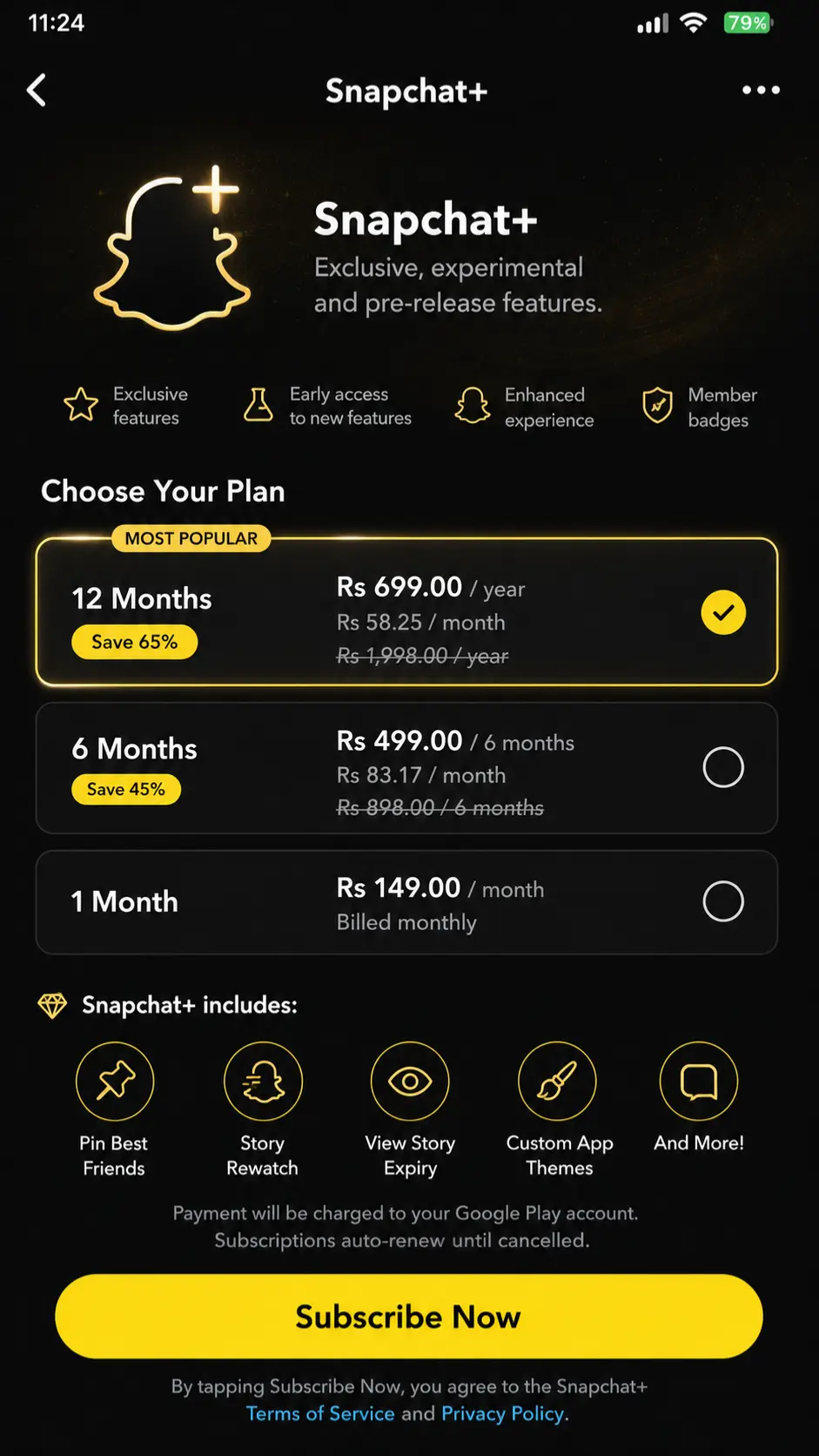
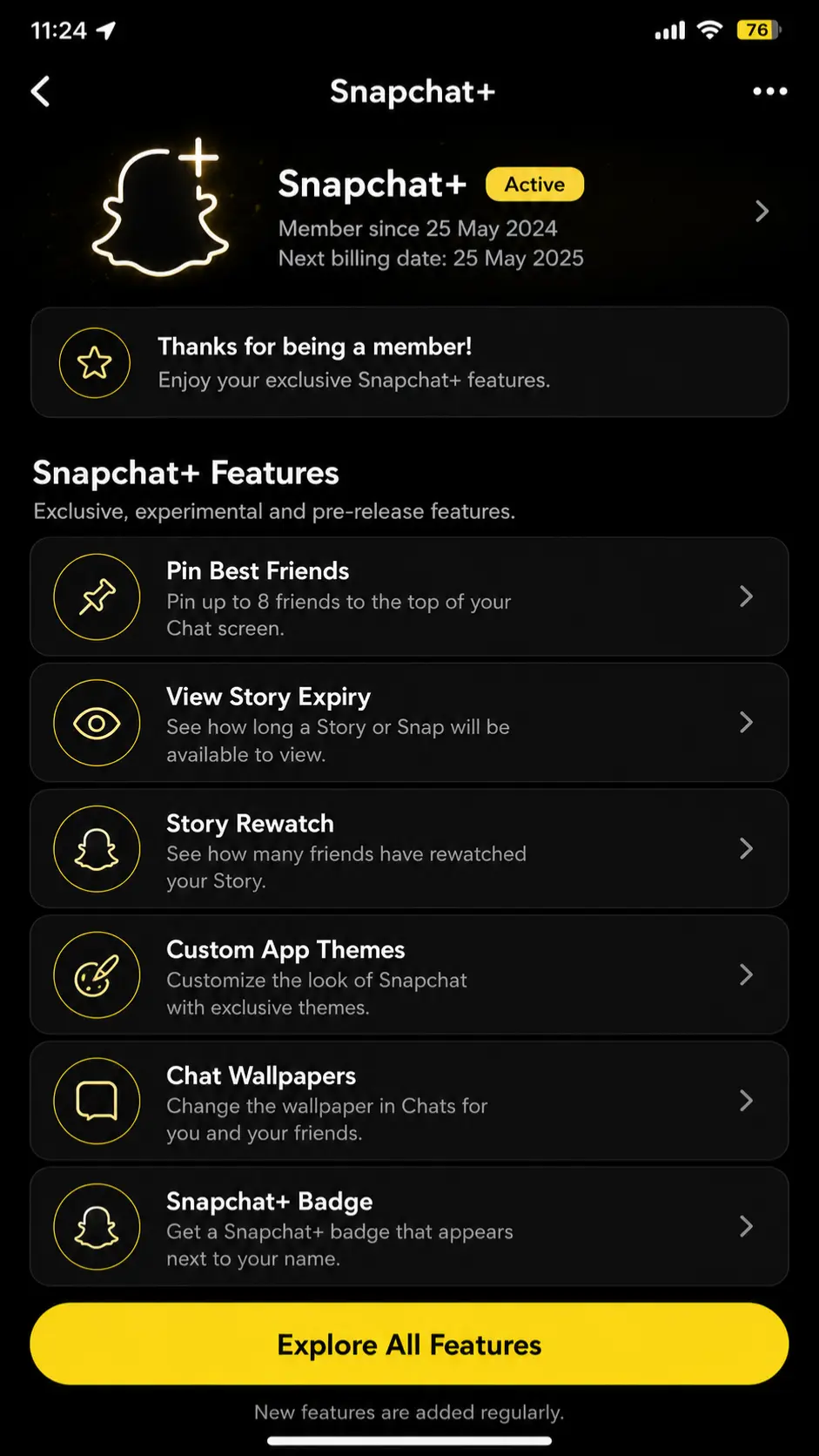
If you want to use Snap Planets, check whether the Friend Solar System is enabled after activating your subscription.
Snapchat Plus Pricing
Snapchat+ offers monthly and yearly subscription options, while additional plans such as Snapchat+ Platinum, Lens+, and Family may also be available. The exact price you see can vary depending on your location, device, app store, and current promotions.
For U.S. users, the standard Snapchat+ subscription has commonly been offered at around the following prices:
| Snapchat+ Plan | Price |
| Monthly Plan | Around $3.99/month |
| 6-Month Plan | Around $21.99 |
| Annual Plan | Around $39.99/year |
Before subscribing, check the price displayed inside your Snapchat app or on the subscription checkout screen. This will show the most current price and renewal terms available for your account.
How to Cancel Snapchat+
Snapchat+ billing and cancellation is handled entirely through your device’s app store, not inside Snapchat itself.
On iPhone:
- Open the App Store and tap your profile icon.
- Tap Subscriptions.
- Select Snapchat+.
- Tap Cancel Subscription and confirm.
On Android:
- Open the Google Play Store and tap your profile icon.
- Go to Payments & subscriptions, then Subscriptions.
- Select Snapchat+.
- Tap Cancel subscription and confirm.
Your Snapchat+ features, including the Friend Solar System, typically stay active until your current billing cycle ends. After that, the planets and other subscriber-only features disappear until you resubscribe.
Snapchat Friend Emojis and How They Relate to Planets
Planets are not the only way Snapchat shows friendship strength. The classic Friend Emoji system, confirmed directly on Snapchat’s support pages, still runs alongside the Solar System:
|
Emoji |
Name |
Meaning |
|---|---|---|
|
💛 |
Besties |
You are each other’s #1 Best Friend |
|
❤️ |
BFF |
You have been each other’s #1 Best Friend for two weeks straight |
|
💕 |
Super BFF |
You have been each other’s #1 Best Friend for two months straight |
|
😊 |
BFs |
They are one of your Best Friends, but not your #1 |
|
😬 |
Mutual Besties |
Your #1 Best Friend is also their #1 Best Friend |
|
😎 |
Mutual BFs |
One of your Best Friends is also one of theirs |
|
🔥 |
Streak |
You are on an active Snap streak together |
|
🎂 |
Birthday |
It is their birthday, based on what they entered in their profile |
If someone shows up as your Mercury in the Snapchat Solar System, there is a good chance you will also see the yellow heart Besties emoji next to their name, since both are pointing at the same thing, you are each other’s #1 Best Friend.
Can You Use Snapchat Planets Without Snapchat+?
There is no permanent free way to access the Friend Solar System, it is locked behind an active Snapchat+ subscription. That said, there are two limited ways people commonly get a look at it without an ongoing payment:
- The Snapchat+ free trial. New subscribers are typically offered a short free trial period. You can enable the Friend Solar System, check the planets you’re curious about, and cancel before the trial ends if you don’t want to keep paying. This is the only legitimate free method.
- Viewing through a friend’s device. If a friend already has Snapchat+, they can open your profile from their own phone and tell you which planet you are in their solar system. You still won’t be able to see your own solar system on your device without subscribing yourself.
What to avoid: Any website, app, or “Snapchat Planet checker” that claims to reveal your planet ranking for free, without you or your friend having an active Snapchat+ subscription, does not actually work. At best these are non-functional gimmicks. At worst they are designed to collect your Snapchat login details. Never enter your Snapchat username or password into a third-party site or app for this.
How to Check Your Planet on Someone Friend Solar System
If you want to find out which planet represents your position in a friend’s Solar System, follow these steps:
- Open the Snapchat app.
- Go to the Chat screen and select your friend.
- Tap their Bitmoji or name to open the friendship profile.
- Look for the relevant friendship badge on their profile.
- Tap the badge to open the Friend Solar System view, if available.
- Look at the planet shown with your Bitmoji.
- Match that planet with the order from Mercury (#1) to Neptune (#8).
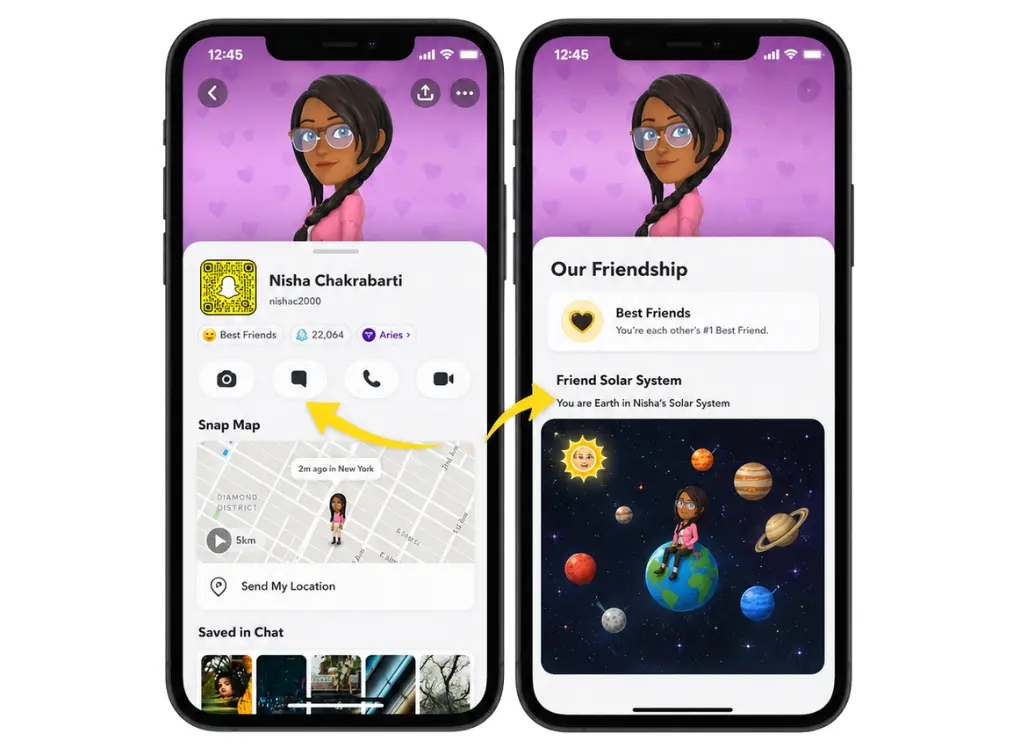
For example, Mercury represents position #1, Earth represents #3, and Neptune represents #8.
If you cannot see a planet, check whether you have access to Snapchat+, whether the Friend Solar System is enabled, and whether the friendship currently qualifies for a planet to be displayed.
Why Did My Snapchat Solar System Change Without Me Doing Anything?
This is one of the most confusing moments for Snapchat+ users. You check a friend’s Friend Solar System one day and you’re Mercury, and a few weeks later you’ve dropped to Earth or Mars, even though you feel like nothing changed on your end. The truth is, something usually did change, just not on your side.
Here’s what actually moves the needle:
- Recency matters more than history: Snapchat weighs your last few weeks of activity more heavily than months of past interaction. A strong streak from three months ago won’t hold your position today.
- Your friend’s other friendships shifted: Planet rankings are relative, not absolute. If someone else started snapping that friend more often, they can take your spot even if your own activity stayed exactly the same.
- A broken streak has a bigger impact than it seems: Even a short gap in daily Snaps can lower your ranking, especially if it hasn’t recovered yet.
- Your interaction dropped without you noticing: Fewer replies, shorter conversations, or less Story engagement all count.
The key thing to remember: your Snapchat Planet position isn’t a fixed score, it’s a constantly shifting comparison against everyone else in that person’s activity. Ranking movement is normal and doesn’t always mean the friendship changed.
Do You and Your Friend See the Same Planet?
No, and this surprises a lot of people the first time they compare notes with a friend. Every Friend Solar System is personal. Your planet position for someone is based entirely on your own Snapchat activity with them, not a shared or mutual calculation.
That means:
- You could be someone’s Mercury while they show up as your Jupiter, and both would be correct.
- Rankings depend on each person’s individual top-eight list, which is different for everyone based on who they interact with most.
- Both people need an active Snapchat+ subscription with the Friend Solar System enabled to see any planet at all. If only one person has it turned on, neither of you will see a ranking for that friendship.
There’s no way to “sync” or compare planets directly inside the app. If you want to know where you stand with someone, the only way is to check their profile yourself, and understand that what you see reflects your activity, not theirs.
Snapchat Best Friends List vs Snapchat Planets
The Snapchat Best Friends list system and Snapchat Planets are closely connected, but they are not exactly the same feature. The Best Friends list system identifies people you interact with frequently on Snapchat. The Friend Solar System adds a visual layer to this concept by representing positions using planets from Mercury to Neptune.
The main difference is presentation. Instead of only relying on traditional friendship indicators, Snapchat+ users can use the Friend Solar System to understand a position through a planet. Mercury corresponds to #1, Venus to #2, and the order continues until Neptune at #8.
Difference between Best Friends and Friends badges?
Friendship badges can help Snapchat+ users understand their relationship within the Friend Solar System. However, Snapchat’s interface and badge presentation can change as the app is updated, so older guides and screenshots may not always match what you currently see.
Best Friends Badge
A Best Friends badge is associated with a close Snapchat friendship based on the app’s Best Friends system. When the Friend Solar System is available for that friendship, interacting with the badge may reveal a planet and its corresponding position.
Friends Badge
The Friends badge has historically been used to indicate a different friendship relationship within the Solar System system, including situations where the Best Friends relationship is not mutual.
Because Snapchat has changed how badges are displayed over time, it is best to use the planet revealed through the current app interface rather than relying entirely on an older badge screenshot or description.
Is Snapchat good for Younger Users?
Snapchat offers creative ways for younger users to communicate with friends, but features that visually rank friendships can also create social pressure. A user may feel disappointed after discovering that they are Neptune instead of Mercury in a close friend’s Solar System. However, a Snapchat Planet reflects an in-app ranking, not the true quality or importance of a real-world friendship.
This is one reason the Friend Solar System should be treated as a fun social feature rather than a friendship scorecard. Parents and younger users should also make use of Snapchat’s available privacy and safety controls and avoid placing too much importance on changing planet positions.
How to Enable the Snapchat Friend Solar System?
If you have access to Snapchat+ but cannot see Snapchat Planets, the Friend Solar System may need to be enabled.
Follow these steps:
- Open Snapchat.
- Tap your Bitmoji or profile icon.
- Open the Snapchat+ section.
- Find the Friend Solar System option among the available features.
- Turn the feature on.
- Confirm the change if Snapchat displays a confirmation message.
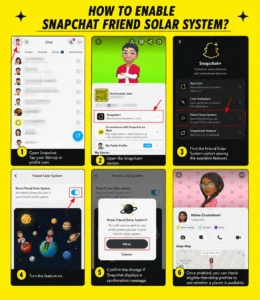
Once enabled, you can check eligible friendship profiles to see whether a planet is available.
How to Disable Friend Solar System on Snapchat?
You can turn off the Friend Solar System if you no longer want to use Snapchat Planets.
- Open Snapchat and go to your profile.
- Open the Snapchat+ section.
- Find a Friend Solar System.
- Turn the toggle off.
- Confirm your choice if prompted.
Disabling the Friend Solar System does not necessarily mean you have canceled your Snapchat+ subscription. It simply turns off that particular feature.
Why Some Users Disable the Snap Solar System
Some users choose to disable Snapchat Planets because they:
Your Snapchat Planet should be viewed as an app feature rather than a measure of your importance to another person.
Why Can’t I See Snapchat Planets? (Troubleshooting)
If you open a friend’s profile and don’t see a planet at all, it’s usually one of a few common issues rather than a bug specific to your account.
Check these in order:
- Confirm your Snapchat+ subscription is active: The Friend Solar System is a paid-tier feature only, and an expired subscription silently disables it.
- Check the feature toggle in Snapchat+ settings: Even with an active subscription, the Friend Solar System has to be manually turned on. It doesn’t activate automatically.
- Make sure the friend qualifies for a ranking yet: If you haven’t interacted enough for Snapchat to place them in your top eight, no planet will appear for that profile.
- Update the app: Older versions of Snapchat sometimes don’t render newer Friend Solar System features properly.
- Restart or clear the app cache: Temporary glitches are common after app updates and usually clear up after a restart or a log-out/log-in cycle.
- Give it time after enabling: The feature can take a short while to populate rankings the first time it’s switched on.
If you’ve checked all of the above and planets still aren’t showing, the feature may simply not have rolled out to your account yet, since Snapchat sometimes releases updates gradually rather than to everyone at once.
How to Improve Your Snapchat Planet’s Ranking
There is no official shortcut or guaranteed trick for moving from Neptune to Mercury. Snapchat does not publicly provide the exact formula used to calculate Friend Solar System positions. Since Snapchat’s Best Friends system is connected to how users interact on the platform, maintaining genuine and regular communication with a friend may affect how your friendship is ranked over time.
You can naturally stay connected by:
The same logic works in reverse. Since positions update automatically based on activity, a drop in communication, not just an increase, is often what moves someone’s rank rather than any single action pushing it up.
Be careful with claims that specific actions, such as sending video Snaps instead of photos or replying within a certain number of minutes, will automatically increase your planet ranking. Snapchat has not publicly provided an exact point system for becoming Mercury, Venus, or any other planet.
Pros and Cons of Snapchat Plus Planets
| Pros | Cons |
| Offers a fun, visual way to explore friendship rankings | Requires access to Snapchat+ |
| Makes the Best Friends system easier to visualize | Rankings can create unnecessary social comparison |
| Uses unique planet designs and Bitmoji visuals | The exact ranking algorithm is not publicly explained |
| Adds an interactive element to friendship profiles | Changing positions may confuse some users |
| Positions can reflect changes in Snapchat friendship rankings | Users may take rankings more seriously than intended |
Final Words
Snapchat Planets turn the Friend Solar System into a visual ranking experience, with eight planets representing positions from Mercury at #1 to Neptune at #8. Once you understand the order, it becomes much easier to recognize what your assigned planet represents when viewing an eligible friendship profile.
The most important thing to remember is that a Snapchat Planet represents an in-app friendship position, not the true value of a relationship. Rankings can change over time, and Snapchat does not publicly reveal an exact formula for calculating every position. Whether you appear as Mercury, Earth, or Neptune, treat the Friend Solar System as a fun Snapchat+ feature rather than a score for your real-life friendships.